nanobot 是什么
nanobot 是一个极致轻量化的 AI 个人助理,源于 OpenClaw。和 OpenClaw、Manus、Claude Code 同属一类产品,只是作者用 Python 重写了一遍,大约用 OpenClaw 的 1% 代码量复刻了同等量级的能力。
读这篇笔记能顺着代码搞清楚两件事:一个 agent 框架从零到可用大致长什么样,以及 nanobot 在 OpenClaw 基础上做了哪些抽象上的优化。
极致精简的代码量背后是良好的抽象与设计,同时也更适合用来做研究学习。nanobot 的主要能力:
- ReAct Loop:当前主流的 agent 推理循环
- 上下文管理:自动的上下文压缩策略
- 双层 memory 系统:长期事实记忆 + 历史记录
- 10+ 聊天渠道:Telegram、Discord、飞书、钉钉、微信、Slack、QQ、Email、WhatsApp、Matrix
- 20+ LLM 供应商:OpenAI、Claude、DeepSeek、Gemini、通义千问、Kimi 等
- MCP 协议
整体架构
架构分层
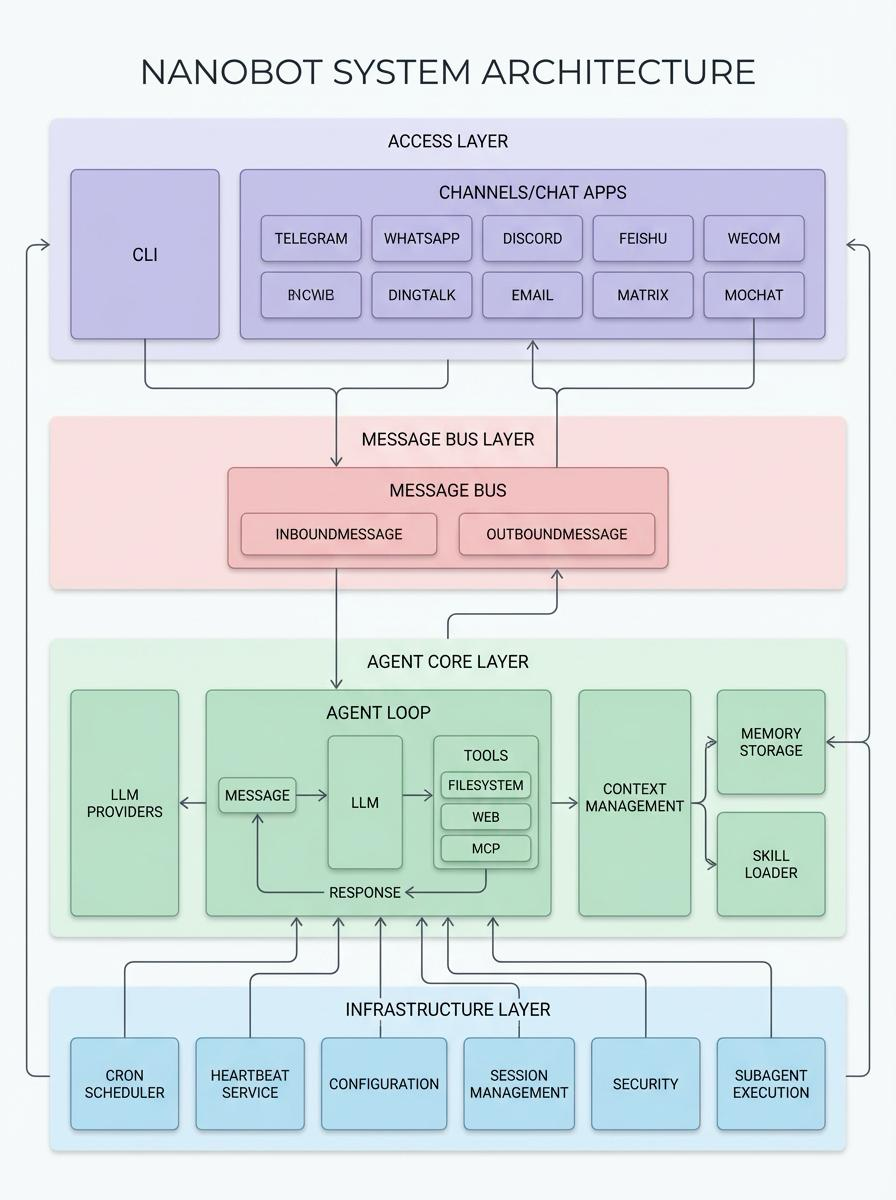
GitHub 上给的架构图比较简略,但足以看清核心模块。
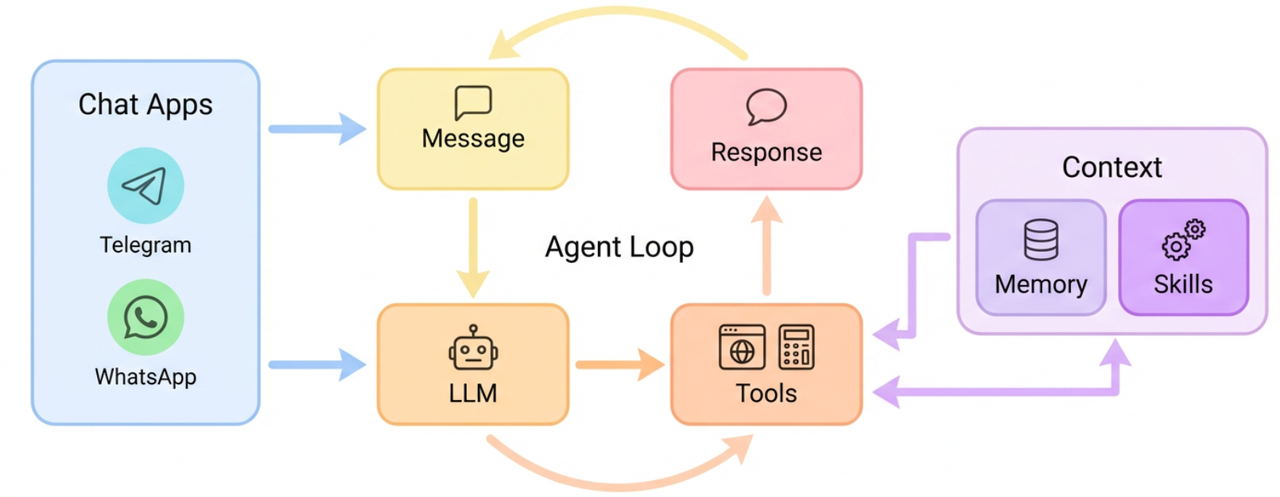
整体分四层:
- Access Layer:命令行工具 CLI、聊天工具
- Message Bus Layer:封装的消息总线,两个 Queue 抽象了消息的收发,屏蔽了不同 Channel 聊天平台的差异
- Agent Core Layer:核心部分,包含 ReAct Loop、Context 上下文管理、Memory 管理、Skill、LLM Providers
- Infrastructure Layer:Cron 定时任务、心跳检测、session 会话管理、安全、配置加载
项目结构
nanobot/
├── nanobot/                    # 核心 Python 包
│   ├── agent/                 # 核心代理层 (Agent Core)
│   │   ├── loop.py            #   ReAct 主循环 (思考->行动->观察)
│   │   ├── context.py         #   Prompt 组装车间
│   │   ├── memory.py          #   记忆系统 (长短期记忆合并与持久化)
│   │   ├── skills.py          #   技能加载与解析器
│   │   ├── subagent.py        #   子任务/子代理管理器
│   │   └── tools/             #   内置工具库
│   ├── bus/                   # 消息总线 (Message Bus)
│   │   ├── events.py          #   定义标准消息结构 (Inbound/Outbound)
│   │   └── queue.py           #   异步队列,解耦 Channels 和 Agent
│   ├── channels/              # 渠道适配层 (Channel Adapters)
│   │   ├── base.py            #   渠道基类 (公共接口: 接收、发送、权限校验)
│   │   ├── telegram.py        #   Telegram 机器人接入
│   │   ├── feishu.py          #   飞书接入
│   │   └── ...                #   Slack, Email, DingTalk 等
│   ├── providers/             # 模型适配层 (LLM Providers)
│   ├── skills/                # 内置技能包 (Built-in Skills)
│   ├── session/               # 会话管理
│   ├── cron/                  # 定时任务
│   ├── heartbeat/             # 心跳服务
│   ├── config/                # 配置管理
│   ├── cli/                   # 命令行界面
│   └── utils/                 # 通用工具类
└── docs/                      # 开发者文档
深度解析
ReAct Loop
ReAct(Reasoning + Acting)把 CoT 和工具调用拼起来,模拟”推理 - 调用工具 - 再推理”的循环,是当前主流的 agent 范式。nanobot 的实现很干净:
async def _run_agent_loop(self, initial_messages, on_progress) -> tuple[str | None, list[str], list[dict]]:
    """Run the agent iteration loop."""
    messages = initial_messages
    iteration = 0
    final_content = None
    while iteration < self.max_iterations:
        iteration += 1
        tool_defs = self.tools.get_definitions()
        # 调用 LLM 推理
        response = await self.provider.chat_with_retry(
            messages=messages,
            tools=tool_defs,
            model=self.model,
        )
        if response.has_tool_calls:
            tool_call_dicts = [
                tc.to_openai_tool_call()
                for tc in response.tool_calls
            ]
            # 把 LLM 推理结果加入上下文
            messages = self.context.add_assistant_message(messages, response.content, tool_call_dicts)
            # 执行工具调用
            for tool_call in response.tool_calls:
                result = await self.tools.execute(tool_call.name, tool_call.arguments)
                # 工具结果加入上下文
                messages = self.context.add_tool_result(
                    messages, tool_call.id, tool_call.name, result
                )
        else:
            clean = self._strip_think(response.content)
            # 不把 error response 写回 session history,避免污染上下文导致持续 400
            if response.finish_reason == "error":
                ...
            messages = self.context.add_assistant_message(...)
            final_content = clean
            break

    if final_content is None and iteration >= self.max_iterations:
        logger.warning("Max iterations ({}) reached", self.max_iterations)
        final_content = (
            f"I reached the maximum number of tool call iterations ({self.max_iterations}) "
            "without completing the task. You can try breaking the task into smaller steps."
        )

return final_content, tools_used, messages这里有个细节值得注意:finish_reason == "error" 时不把 response 写回历史。错误响应一旦进上下文就会反复污染后续调用,是生产环境容易踩的坑。
上下文管理 — ContextBuilder
ContextBuilder 负责把 agent 每次调用的完整上下文拼出来,包含:
- runtime_ctx:运行时信息,channel、chatID
- user_content:用户输入,支持多模态;
_build_user_content内部封装多模态数据解析,必要时调外部工具 - system_prompt:
_get_identity:身份信息(# nanobot 🐈 You are nanobot, a helpful AI assistant.)_load_bootstrap_files:加载["AGENTS.md", "SOUL.md", "USER.md", "TOOLS.md"]- 短期记忆:从 memory 模块加载
- skill:常驻 skill 的
SKILL.md全量进 context;其他 skill 走渐进式披露,只挂一个 summary(name+description)
对话中后续的信息和工具调用都会追加到 context 上。
class ContextBuilder:
    """Builds the context (system prompt + messages) for the agent."""

    BOOTSTRAP_FILES = ["AGENTS.md", "SOUL.md", "USER.md", "TOOLS.md"]

    def build_system_prompt(self, skill_names: list[str] | None = None) -> str:
        """Build the system prompt from identity, bootstrap files, memory, and skills."""
        parts = [self._get_identity()]
        # 加载引导文件
        bootstrap = self._load_bootstrap_files()

        # 加载短期记忆
        memory = self.memory.get_memory_context()

        # 加载常驻技能
        always_skills = self.skills.get_always_skills()

        # 加载技能摘要
        skills_summary = self.skills.build_skills_summary()
        if skills_summary:
            parts.append(f"""# Skills

The following skills extend your capabilities. To use a skill, read its SKILL.md file using the read_file tool.
Skills with available="false" need dependencies installed first - you can try installing them with apt/brew.

{skills_summary}""")

        return "\n\n---\n\n".join(parts)

    def build_messages(self, history, current_message, skill_names, media, channel, chat_id, current_role) -> list[dict[str, Any]]:
        """Build the complete message list for an LLM call."""
        runtime_ctx = self._build_runtime_context(channel, chat_id)
        user_content = self._build_user_content(current_message, media)

        # 把 runtime context 和 user content 合到同一条 user 消息里,
        # 避免某些 provider 拒绝连续同 role 消息
        if isinstance(user_content, str):
            merged = f"{runtime_ctx}\n\n{user_content}"
        else:
            merged = [{"type": "text", "text": runtime_ctx}] + user_content

        return [
            {"role": "system", "content": self.build_system_prompt(skill_names)},
            *history,
            {"role": current_role, "content": merged},
        ]

    def add_tool_result(): ...
    def add_assistant_message(): ...
“合并 runtime context 和 user content 进同一条 user 消息”这个处理很细节——不少 provider(包括 Claude)不允许连续同 role 的消息,这种合并是踩过坑之后才会加的。
Memory — 双层记忆
nanobot 的记忆系统由长期事实 MEMORY.md + 可搜索历史 HISTORY.md 组成。
class MemoryStore:
"""Two-layer memory: MEMORY.md (long-term facts) + HISTORY.md (grep-searchable log)."""| MEMORY.md | HISTORY.md | |
|---|---|---|
| 定位 | 长期事实记忆,相当于 agent 的大脑认知 | 带时间戳的 grep 友好历史日志 |
| 读取时机 | 每轮对话都加载进 system prompt | 按需搜索 |
| 写入方式 | 全量覆盖写 | 尾部 append |
为什么 MEMORY.md 是全量覆盖写? 它是长期事实记忆——相当于 agent 的世界模型,新的事实往往需要修正旧的认知,而不是简单追加。更新 MEMORY.md 的 prompt 也是这个逻辑:返回一份完整的、合并了新旧事实的新版本;若没有新信息,原样返回。
Memory 归档机制 — consolidate
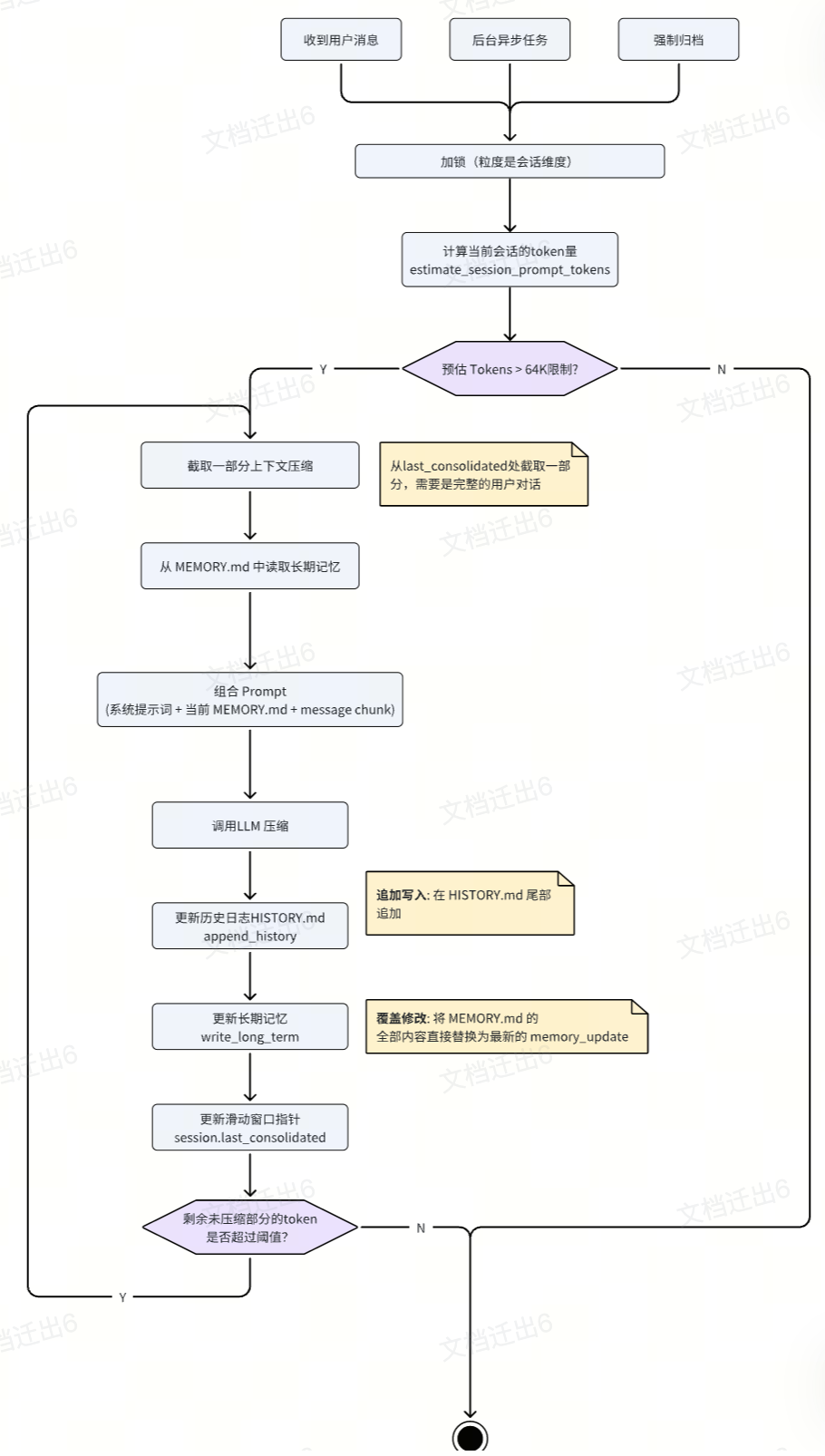
LLM 上下文窗口有限(nanobot 默认 64K),对话变长必然会撞到上限,需要一套归档机制。整体流程:
- 触发时机:收到用户消息时同步触发;后台协程空闲异步执行;用户输入
/new清空会话时强制归档 - 加锁:用
session.key加锁,避免后台异步任务并发执行 - Chunk 选取:判断当前消息 token 超出安全上限后,在自然对话轮次处切一刀(
pick_consolidation_boundary),取最老的一批未归档消息作为 chunk - 记忆合并(MEMORY.md):把 chunk 连同现有
MEMORY.md整体喂给大模型,通过save_memory工具把新老知识融合成一份新 memory,然后完全覆盖原MEMORY.md - 历史追加(HISTORY.md):模型同时输出一份该 chunk 的摘要(
history_entry),append 进HISTORY.md,构成线性增长的时间线 - 滑动窗口:单轮归档完成后游标前移;若剩余未归档 token 还高于
context_window_tokens / 2(默认 32K),继续循环
一个实用的稳定性设计:如果连续多次 consolidate 失败,nanobot 会降级为 raw archive——把原始消息直接 dump 到 HISTORY.md。宁可记得粗糙也不要阻塞主流程,这种 graceful degradation 是 agent 系统里被严重低估的设计习惯。
Skill 的渐进式加载
def build_system_prompt(self, skill_names: list[str] | None = None) -> str:
    """Build the system prompt from identity, bootstrap files, memory, and skills."""
    parts = [self._get_identity()]
    bootstrap = self._load_bootstrap_files()

    # 加载短期记忆
    memory = self.memory.get_memory_context()
    if memory:
        parts.append(f"# Memory\n\n{memory}")

    # 加载常驻技能
    always_skills = self.skills.get_always_skills()
    if always_skills:
        always_content = self.skills.load_bootstrap_files(always_skills)
        if always_content:
            parts.append(f"# Active Skills\n\n{always_content}")

    # 加载技能摘要(非常驻)
    skills_summary = self.skills.build_skills_summary()
    if skills_summary:
        parts.append(f"""# Skills
The following skills extend your capabilities. To use a skill, read its SKILL.md file using the read_file tool.
Skills with available="false" need dependencies installed first - you can try installing them with apt/brew.
{skills_summary}
""")

    return "\n\n---\n\n".join(parts)
常驻 skill 直接把 SKILL.md 塞进 system prompt;其他 skill 只挂 summary,用到时让模型自己 read_file 去取。这就是 Anthropic Skills 推的那套 Progressive Disclosure,nanobot 照抄没改。
消息总线 — MessageBus
MessageBus 里定义两个队列,inbound / outbound 各一条,用来解耦 channel 和 agent core。
class MessageBus:
    """
    Async message bus that decouples chat channels from the agent core.

    Channels push messages to the inbound queue, and the agent processes
    them and pushes responses to the outbound queue.
    """

    def __init__(self):
        self.inbound: asyncio.Queue[InboundMessage] = asyncio.Queue()
        self.outbound: asyncio.Queue[OutboundMessage] = asyncio.Queue()

    async def publish_inbound(self, msg: InboundMessage) -> None:
        """Publish a message from a channel to the agent."""
        await self.inbound.put(msg)

    async def consume_inbound(self) -> InboundMessage:
        """Consume the next inbound message (blocks until available)."""
        return await self.inbound.get()

    async def publish_outbound(self, msg: OutboundMessage) -> None:
        """Publish a response from the agent to channels."""
        await self.outbound.put(msg)

    async def consume_outbound(self) -> OutboundMessage:
        """Consume the next outbound message (blocks until available)."""
        return await self.outbound.get()
BaseChannel 是 channel 基类,所有子类都走基类的 _handle_message 把消息塞进 inbound 队列,天然做到统一处理和解耦。
class BaseChannel(ABC):
    async def _handle_message(self, sender_id, chat_id, content, media, metadata, session_key) -> None:
        """Handle an incoming message from the chat platform."""
        await self.bus.publish_inbound(msg)
快速上手
安装:
uv tool install nanobot-ai初始化:
nanobot onboard配置 API Key,vim ~/.nanobot/config.json:
{
  "agents": {
    "defaults": {
      "workspace": "~/.nanobot/workspace",
      "model": "ep-20260303165437-6tjxw",
      "provider": "openrouter",
      "maxTokens": 8192,
      "contextWindowTokens": 65536,
      "temperature": 0.1,
      "maxToolIterations": 40,
      "reasoningEffort": null
    }
  },
  "providers": {
    "openrouter": {
      "apiKey": "xxxxxxxx-xxxx-xxxx-xxxx-xxxxxxxxx",
      "apiBase": "https://ark-cn-beijing.bytedance.net/api/v3",
      "extraHeaders": null
    }
  }
}
启动对话:
nanobot agent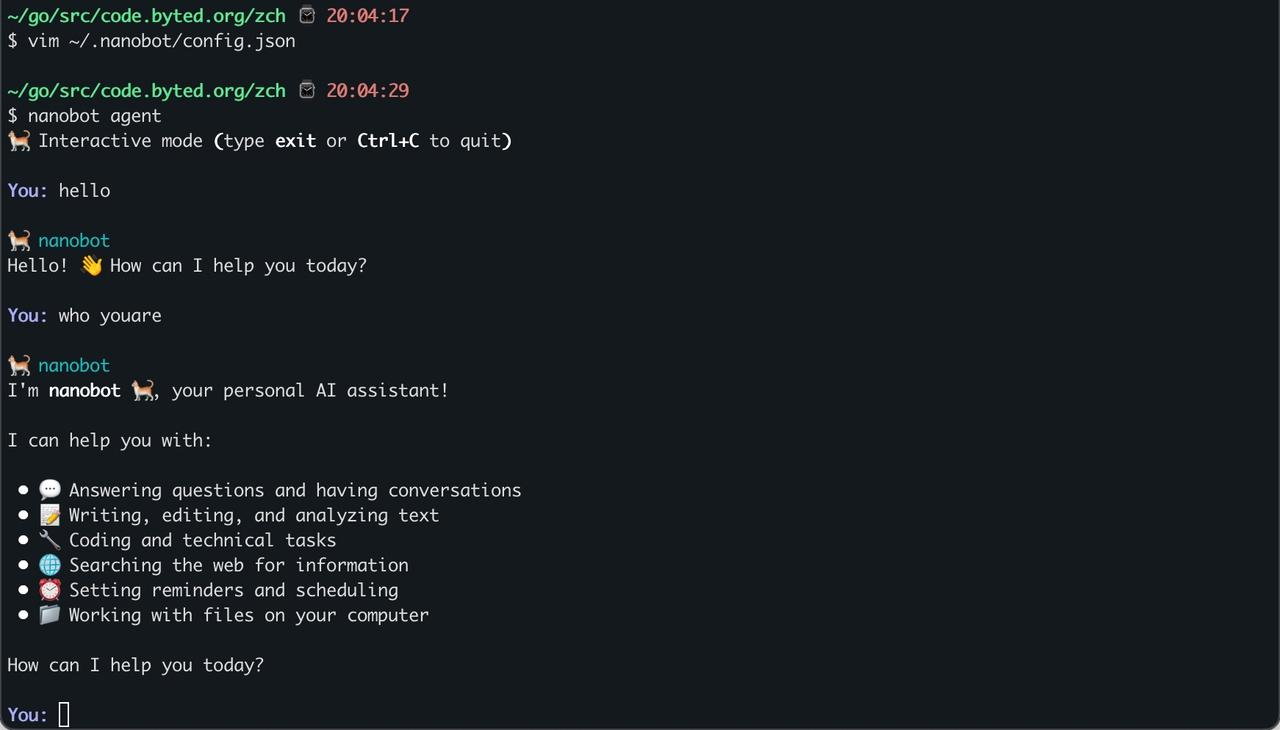
对接飞书机器人
同样改 ~/.nanobot/config.json:
{
  "feishu": {
    "enabled": true,
    "appId": "cli_a94f94d0cd79dcc9",
    "appSecret": "GiTsoeePmZSUBiwi2l46reeUdJZXMlFR",
    "encryptKey": "",
    "verificationToken": "",
    "allowFrom": ["*"],
    "reactEmoji": "THUMBSUP",
    "groupPolicy": "mention",
    "replyToMessage": false
  }
}
配置完就能用了。
小结
通读下来 nanobot 的可学习价值不在某个单点,而在抽象的克制。同样一套 ReAct + Memory + Skill + Channel 的组合,它用最少的类和接口把 OpenClaw 的核心能力拼齐。值得抄走的几个细节:error response 不进历史、runtime context 合并到 user 消息、consolidate 失败降级为 raw archive、skill 走两层加载。这些都是在生产 agent 上踩过坑之后才会加的小补丁,也是评估一个 agent 框架是否真正被用过的判据。